
I run my own CRM out of a chat window. There's no vendor login and no screen full of lists and forms. The records live in a Supabase database, and a Grok Bot reads and writes them when I ask in plain English. When someone fills out the contact form on this site, I get an email, and a new contact shows up in my CRM without me touching anything.
I set it up with solopreneurs and small teams in mind. This post walks through how it's put together, what each connected tool does, and where the setup is still rough. You can copy it as is or use it as a starting point. There are plenty of other ways to wire this up.
What a headless CRM is, and who it's for
A headless CRM doesn't have the traditional interface. The data still lives in proper tables, but you work with it mostly by talking to an AI agent. You ask for a contact, a deal update or a pipeline total, and the agent runs the query.
| Vendor CRM | Headless CRM with Grok Bot | |
|---|---|---|
| How you use it | Click through lists, forms and filters | Ask in plain language and the Bot turns it into SQL |
| Where data lives | The vendor's system | Your own database, such as a Supabase project |
| New fields | Admin settings, within what the vendor allows | Explain what you need and an admin bot updates the schema once you approve |
| Dashboards | Live, built in | Pages the Bot generates, refreshed when you ask |
| Best for | Teams that want structure and done-for-you features | Solopreneurs and small teams who like building their own way |
I'll be blunt about the last row. If you like the structure and the done-for-you parts that CRM vendors give you, this route isn't for you. If you've ever paid for a CRM seat and used a tenth of it, keep reading.
The setup at a glance
These numbers come from my own setup and the pricing I saw when I priced it out.
per user per month when I priced it, plus a paid database plan if you outgrow the free one
core tables: accounts, contacts, deals, activities and documents
building blocks, from the database host to dashboard views
the window my morning briefing uses for deals that are about to close
Prices change, so check the Grok Bot plan docs before you commit. Some features also depend on the plan. The meetings docs, for example, say a Bot that joins calls is available on Team, Enterprise and Ultra plans.
Build the core in three steps
-
Pick a database host
I started with a free Supabase plan. It's a hosted Postgres database, which means your CRM data sits in standard tables you can export or query with any tool later.
-
Connect it and create the tables
Supabase is available as a Grok Bot connector. Connect it, add a project, and create core tables for accounts, contacts, deals, activities and documents. Add a table of drop-down values for stages and statuses, plus any other tables your business model needs. A Bot can do all of this for you. A written spec for the database helps a lot.
-
Start talking to it
From here on, you work in chat. The Bot reads your request, writes the SQL and runs it. You can also ask it to enrich records.
| Table | What goes in it |
|---|---|
| Accounts | The companies you sell to or work with |
| Contacts | The people, each linked to an account when there is one |
| Deals | Opportunities, their stage and their value |
| Activities | Notes, emails, calls, meetings and follow-up tasks |
| Documents | Links to proposals and SOWs stored in Google Drive |
| Drop-down values | The allowed stages and statuses, so every record uses the same words |
From my experienceThe drop-down table pays off fast. In my CRM the values are case-sensitive, so "Lead" works and "lead" doesn't. When I added Lead as a new account status, the code behind my website form had to use that exact spelling.
Talk to your CRM
This is where a headless CRM feels different. Requests like these get turned into SQL that the Bot runs:
Example requests"Add Lou Abbott as a contact at Acme."
"Move the Acme deal to Proposal."
You can ask the database anything through the Bot's chat. Which deals haven't moved in a month? Who did I meet with last week? What's the total open pipeline? There's no report builder to learn. You ask, and it answers from the data.
Connect the tools you already use
A CRM is only as good as what gets into it. These are the connections I'd set up, and what each one does.
| Tool | Job in the CRM |
|---|---|
| Website forms | Netlify Forms on a static HTML site can call a function that creates an account and contact with the stage Lead on each submission |
| Gmail | Logs emails against contact records |
| Google Calendar | Handles meetings and follow-up reminders |
| Meeting Bot | A related Grok Bot joins Zoom or Google Meet calls and creates call notes and transcripts, which get saved as activities |
| Google Drive | Stores proposals and SOWs, linked to the matching accounts or deals |
| Email marketing | Nurture sequences and list emails stay in a platform like ActiveCampaign, MailerLite, Brevo or Nitrosend |
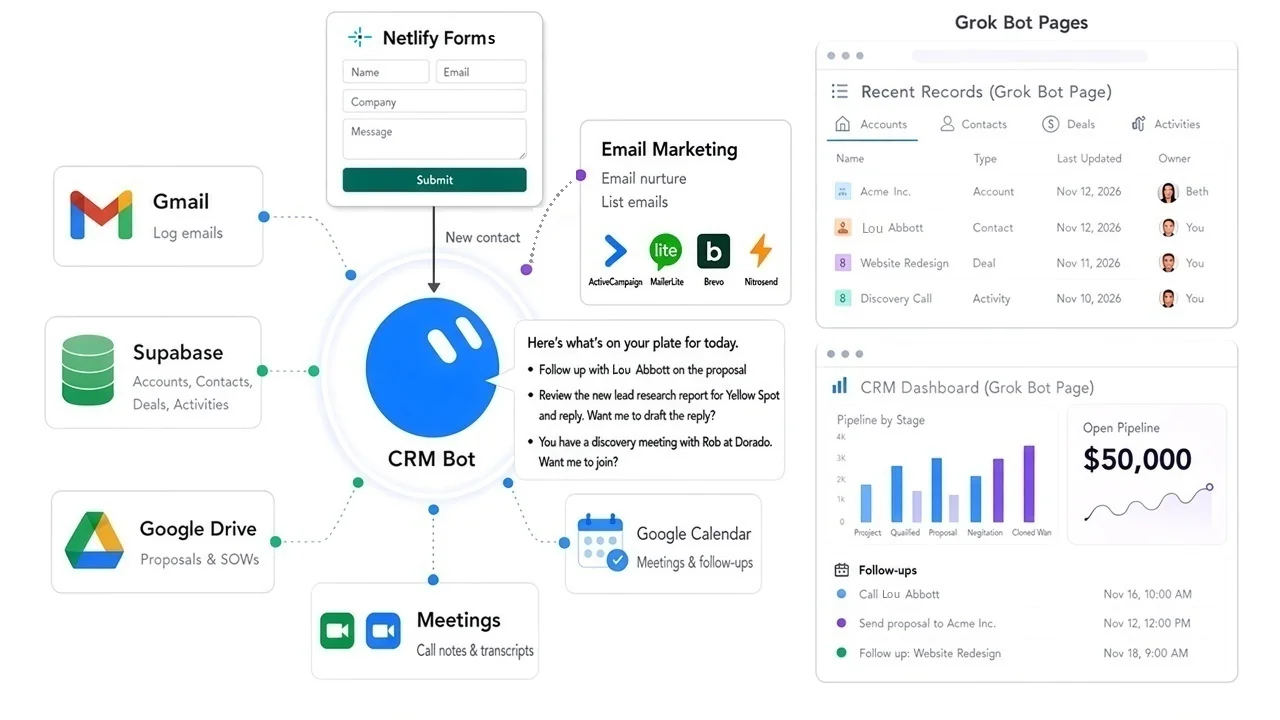
Here's how the website form works. Each contact form submission on this site emails me and creates a new contact in my CRM. If the person fills in the Company field, it also creates an account with the status Lead. If that company is already in the CRM, the existing account is left as it is.
For email marketing, I'd keep a dedicated platform rather than rebuild one. The CRM Bot can add contacts to lists or automations when their status or deal stage changes, so the two stay in step.
The meeting piece goes further than notes. The meeting Bot can also take part in the call. The meetings docs say a Bot can join Google Meet, Zoom or Microsoft Teams calls, answer questions in the meeting chat and send a summary with action items when the call ends.
The morning briefing
A routine runs every weekday morning and reports on five things:
- New leads
- Overdue follow-ups
- Deals closing within 14 days
- Stale deals
- The pipeline total
Watch for thisWhen I shared this setup, someone pointed out a real gap. If a client emails to push a call back, the briefing keeps nagging you about the old date unless it reads the reply too. You can build logic into the Bot to handle this, such as checking recent email before it flags a follow-up as overdue.
Add the fields your business needs
Many CRM systems have a single currency box for the value of a deal. That's fine for one-time sales. It's not great for a business that bills a fixed retainer or a variable amount every month, because you also want to see revenue by month.
I explained the requirement to my CRM Bot and gave it the deal specifics. It updated the database schema to support it and generated a report like the one below. These days a change like that goes through my separate database admin bot, which I explain in the team section below.
| Month | Northwind | Bluebird Dental | Summit Logistics | Total |
|---|---|---|---|---|
| Dec 2026 | $4,000 | $5,000 | None | $9,000 |
| Jan 2027 | $2,000 | $2,500 | $5,000 | $9,500 |
| Feb 2027 | $2,000 | $2,500 | $2,500 | $7,000 |
| Mar 2027 | $2,000 | $2,500 | $2,500 | $7,000 |
| Apr 2027 | $2,000 | $2,500 | $2,500 | $7,000 |
| May 2027 | $2,000 | $2,500 | $2,500 | $7,000 |
| Jun 2027 | None | $2,500 | $2,500 | $5,000 |
| Jul 2027 | None | $2,500 | $2,500 | $5,000 |
| Aug 2027 | None | $2,500 | $2,500 | $5,000 |
| Sep 2027 | None | None | $2,500 | $2,500 |
| Oct 2027 | None | None | $2,500 | $2,500 |
| Nov 2027 | None | None | $2,500 | $2,500 |
| Dec 2027 | None | None | $2,500 | $2,500 |
| Total | $14,000 | $25,000 | $32,500 | $71,500 |
The companies are made up. The point is the shape of the report. A deal that looks like one number in a vendor CRM turns into a month-by-month view of when the money actually arrives.
Seeing your data: Pages and Google Sheets
Sometimes you want to look at the data instead of asking about it. The Bot can generate Pages showing recent records or a pipeline dashboard. The docs describe a Page as something a Bot builds for you to read, like a report, dashboard or tracker, and it can hold tables and charts.
Pages are more static than the lists and forms in a traditional CRM, so you need to ask for a refresh. If you want a spreadsheet copy, you could also add a routine that copies the database to a Google Sheet every day, one table per tab.
More CRM roles to borrow
The Grok Bot use case library has several roles that sit on top of a CRM. These are the ones I'd look at first.
CRM Operations Manager
Sales
Handles CRM and org-chart cleanup before and after meetings, so records stay current without a manual pass.
Meeting Prep Buddy
Sales
Builds prep packs from your calendar, notes, CRM and Slack: who's in the room, the last touch, open threads and a suggested agenda.
Pipeline Analyst
Sales
Scrubs Salesforce and spreadsheets, flags stalled deals and commit risk, and drops a Monday scoreboard.
Account Manager
Customer Success & Support
Preps every call from transcripts, notes, CRM and Slack, drafts follow-ups and keeps next steps current.
Renewal Desk Operator
Sales
Builds a 90-day pack per account from usage, support tickets, call recordings and CRM, and drafts the commercial note.
Account Research Specialist
Sales
Pulls Salesforce data and live signals to score fit and tier accounts before you reach out.
Some of these assume Salesforce, but the jobs translate. Point them at your own database instead.
Team use and safety: two bots, two levels of access
Before I invited anyone else in, I asked my CRM bot a simple question: if teammates use it, can I stop them from changing the database structure? The honest answer was not really. The bot reached Supabase through my connector, which has full admin rights, so anyone chatting with it was in effect using those rights. The database couldn't tell me and a teammate apart. A written rule telling the bot to refuse schema changes from anyone else would be a soft rule, not a lock.
So I split the job between two bots. The CRM bot is the one I share with the team, and it now connects to the database with a restricted login. That login can read, add, edit and delete records, but it can't create, change or drop tables, functions, policies or roles. Structural changes belong to a separate database admin bot that keeps full access, and I'm the only one who uses it.
| CRM bot (shared with the team) | Database admin bot (just me) | |
|---|---|---|
| Database access | A restricted role, reached through Supabase's REST interface with a key tied to that role | The full-access Supabase connector |
| Records | Reads, adds, edits and deletes accounts, contacts, deals and activities | Has full access, but day-to-day records are the CRM bot's job |
| Schema changes | Blocked by the database. It sends a request to the admin bot instead | Makes them, after I approve in its chat |
| Who talks to it | Me and invited teammates | Only me |
Here's how a schema change works now. Say a teammate asks the CRM bot for a new field. The CRM bot can't add it, so it sends the admin bot a request that says what to change, why, and who asked. The admin bot treats that as a proposal, not an order. It only applies the change after I approve it in the admin bot's own chat, because a request from the CRM bot or a teammate doesn't count as my approval. When the change is done, it reports back so the CRM bot can update its notes.
One detail worth knowing. Supabase's read-only connector mode wasn't an option for the shared bot, because it also blocks adding records. A CRM that can't add a contact isn't much use. A custom role that allows record edits but no structural changes was the right fit.
The gap that's leftMy Supabase connector is shared across all my bots, and I couldn't find a setting to turn it off for just one of them. The CRM bot uses the restricted login for all its CRM work and has a standing rule to send schema changes to the admin bot, but the full-access connector is still technically within its reach. That stays a gap until bots can have connectors switched off one at a time.
Readers gave me a few good suggestions when I first shared this setup, and they still apply:
- Start with the Bot reading data and drafting changes, and require a clear yes in chat before it inserts or updates anything in the live database.
- Keep schema changes on a separate approval path from everyday updates, so a teammate can move a deal without being able to change the table it lives in. The two-bot split is how I did this.
- Don't let instructions inside an incoming email turn into a database change.
From my experienceMy website Bot drafts every change, publishes a private preview and waits until I say publish. The admin bot works the same way. It proposes, and nothing about the database structure changes until I say yes.
If you're new to Grok Bot itself, I explain how Bots, skills and routines work in What Is Grok Bot? For another hands-on example, see How to Use Grok Bot for Business Finance.
Frequently asked questions
What is a headless CRM?
It's a CRM without the usual screens of lists and forms. Your accounts, contacts and deals live in a database, and you work with them mostly by chatting with an AI agent that reads and writes the records for you.
How much does it cost to build a CRM with Grok Bot?
When I priced my setup, it came to about $30 per user per month. Supabase has a free plan to start, but you may need a paid database plan later. Check current pricing before you start, because plans change.
Do I need to know SQL?
No. You ask in plain language, like "Move the Acme deal to Proposal," and the Bot writes and runs the SQL. A written spec for your database still helps the Bot keep things consistent.
Can website form submissions go straight into the CRM?
Yes. A form on a static site, such as one using Netlify Forms, can call a function that creates a contact, and an account when a company is given, with the stage Lead. That's how the contact form on this site works.
Can a small team share one CRM Bot?
Yes. I share my CRM bot with a restricted database login that can work with records but can't change tables. Schema changes go to a separate database admin bot that only I use, and it applies them only after I approve. One gap remains: my full-access Supabase connector is shared across my bots, so I'd still be careful about who gets invited.
Can Grok Bot work with an existing CRM instead?
Yes. The Grok Bot changelog lists connectors for Salesforce and Zoho CRM. A headless CRM makes the most sense when you'd rather own the data and skip the vendor's interface.
The bottom line
A headless CRM won't suit everyone. It's more hands-on than a vendor product, and the dashboards don't update themselves. But for a solopreneur or a small team, it's a CRM that fits exactly how you work, and you change it by asking. Start with the database and the five core tables, connect your website form so leads arrive on their own, and add the morning briefing once there's enough data for it to be useful.